
OSM payments guide
How to set up Direct Debits through Online Scout Manager and GoCardless for subs, events and camps. It takes about 5 to 10 minutes.
We use GoCardless for paying your young person's subscription fees, and for camps, events and other costs. It has saved our leaders and group treasurer endless hours of admin.
GoCardless uses the Direct Debit scheme, so all you need is a UK bank account (your 6-digit sort code and 8-digit account number). Unlike BACS payments you don't need online banking, the correct amount is always paid, and it's guaranteed to reach our account.
You'll need to set up three Direct Debits for each young person in our group: one for membership subscriptions, one for events and activities, and one for camps. Subscriptions are normally taken about two weeks into each half term. A payment for an event, activity or camp is set up when you say 'yes' to it in your section's WhatsApp group, and leaves your account on the payment due date. You'll always be told when a payment is coming, and you can cancel it if you want to.
Once your Direct Debits are set up you won't need to set up any more payments. When your young person moves up to a different section they're removed from the old section's payment schedule, and the system will email you to set up new Direct Debits before the first payment.
If you have any problems setting this up, please contact your young person's section leader.
Gift Aid
While you're setting up, you may be asked to sign up to Gift Aid. If you're a UK taxpayer please do: it lets us claim extra money from HMRC at no cost to you.
How to set up the Direct Debit
When you joined our group you will have been sent a link to Online Scout Manager (OSM). It's where we keep your young person's contact details and tell you what we're doing each week and about events and camps. Almost every Scout group in the UK uses it, and it's also where you set up payments with GoCardless.
The steps below set up the Direct Debit for subscriptions. Then do exactly the same for 'Events and Camps'.
- Go to Online Scout Manager and sign in with your email and password. If you don't have a login yet, ask your section leader to send you an email link to set one up.
- Choose your young person's name on the left-hand side, then the 'Payments' tab.
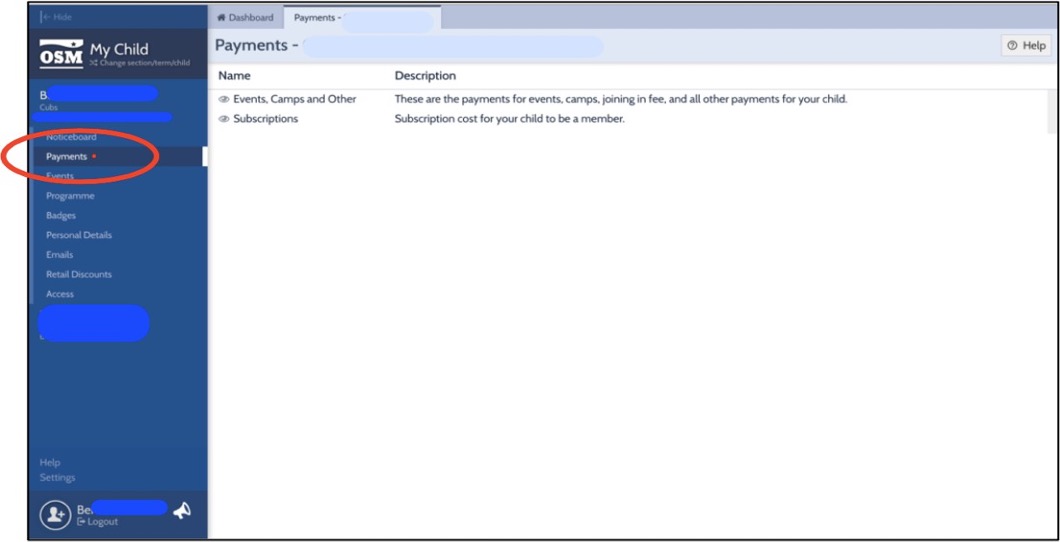
- Choose 'Subscriptions'.
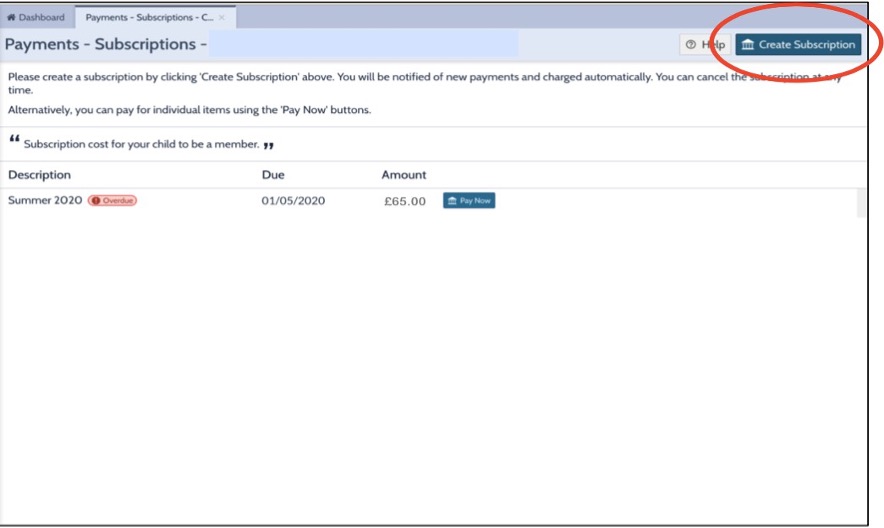
- Choose 'Create Subscription' to set up the Direct Debit. 'Pay now' doesn't set up a Direct Debit: it takes a one-off payment, and you'd need to do it again for every future payment. Creating a subscription is the recommended way. Once it's set up we'll always tell you before we take a payment, so you can cancel or change your bank details if you need to.
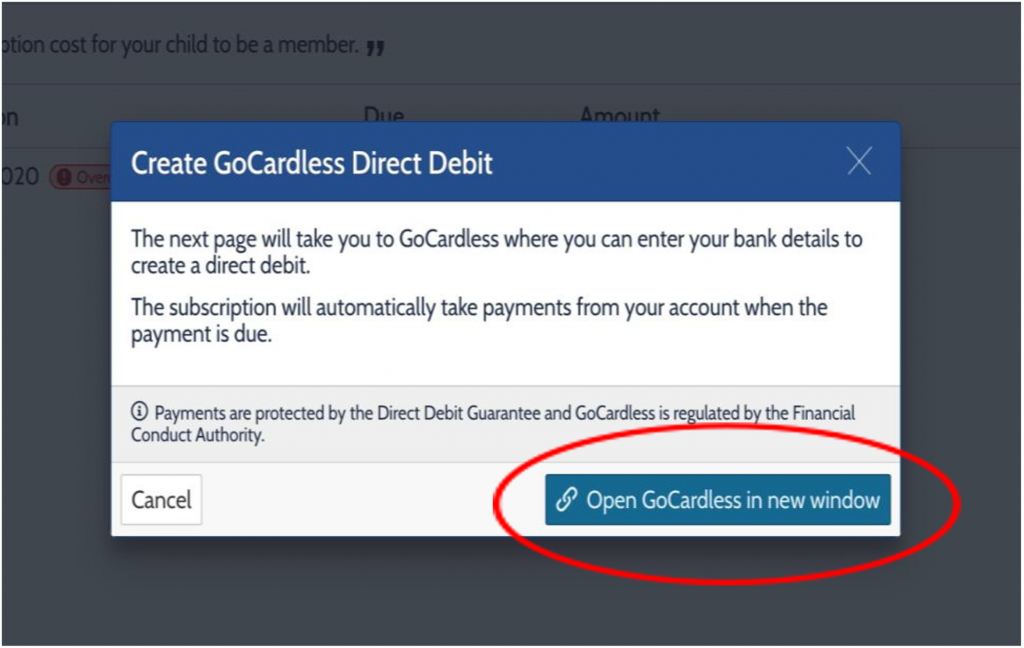
- Choose 'Open GoCardless in new window'. This opens a new tab.
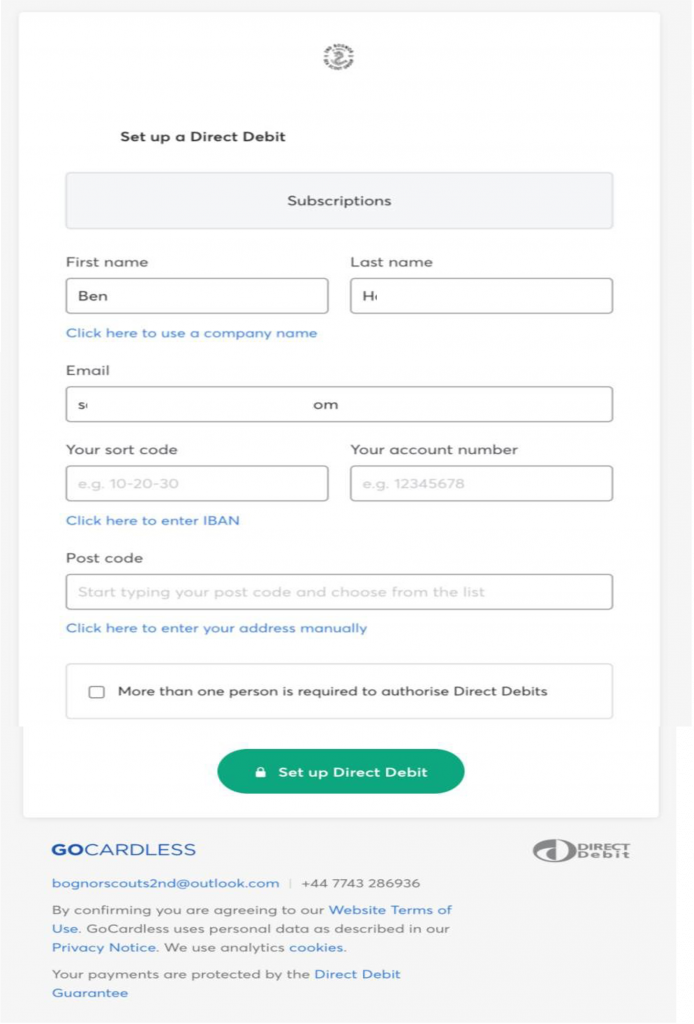
- Enter your UK bank account details and the address your account is registered to (most likely your home address).
- Only tick 'More than one person is required to authorise Direct Debits' if your account needs two people to authorise them; some joint accounts do. There are a few extra steps if you tick it, so please ask your section leader for details.
- Choose 'Set up Direct Debit', then 'Confirm' on the next page. Then choose 'Return to Online Scout Manager'.
Back in OSM, repeat the steps for 'Events, Camps and Other'.
If you have more than one young person in the group, you'll need to do this for each of them.
That's it: your Direct Debits are set up. Thank you!